
Browse your photos and videos in stunning style
CyberLink MediaShow is a comprehensive multimedia suite that enables you to manage and share photos and videos.
The program features a main menu from where you can access its four main sections: Photos, Videos, Disc and Convert. All of them feature a dark, elegant design with eye-catching, three-dimensional animations, which can be a bit heavy on resources for older systems. Oddly enough, there's no way to go back to the main menu from the Photos or Videos tool, so you have to restart the program.
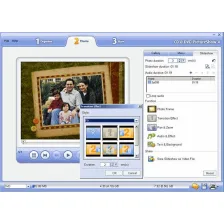
The Photos and Videos areas in CyberLink MediaShow have a similar structure; you can browse the contents of your media folders and open any of the elements (photo, video) in full screen. The menu at the top gives you access to a handful of tools that vary depending on what you're browsing: use as wallpaper, create screensavers, burn to disk (or share on Flickr in the case of photos), and burn on disc, create custom movies and share on YouTube if you're working with videos.
The Disc and Convert areas are a bit different, but easy to use as well. The Disc tool helps you create custom compositions with videos and photos and burn them to DVD or Blu-Ray, while the Convert tool focuses on converting videos from one format to another, with pre-defined conversion templates for popular devices. It doesn't convert pictures though.
CyberLink MediaShow is a complete media manager that will suit the needs of any average user.
Optimized for NVIDIA CUDA to deliver 50% faster analyzing and sorting.Accurate facial detection and recognition technology—up to 95% accuracy.Smart face tagging automatically groups similar faces and suggests names for tagging.Quick photo searching by selecting the person or entering their name.Face tag EXIF data can be shared by MediaShow 5 uers.Auto-fix video noise to improve grainy videos.Apply photo and video fixes in batches to save the user time.Edit Log allows users to view applied edits and undo any time.Arrange slideshow order by simple dragging and dropping.Add video content to slideshows.Insert animated text effects and color boards to slideshows.Select from over 30 styles of transition effects for greater customization.Convert videos to MPEG-2, WMV, AVC (H.264).Convert videos to Apple, Sony and Microsoft devices.Convert batch videos to save users time.Optimized for Intel Corei7, ATI Stream and NVIDIA CUDA technology to deliver up to 10X faster video conversions.NEWVideos can be sent directly to a user’s iTunes library.Name tag information is uploaded with users’ photos to Facebook.Improved video sharing on YouTube and Facebook.Improved photo sharing on Facebook and Flickr.Author Blu-ray* and AVCHD discs* for preserving and sharing HD content.
Changes
Optimized for NVIDIA CUDA to deliver 50% faster analyzing and sorting.Accurate facial detection and recognition technology—up to 95% accuracy.Smart face tagging automatically groups similar faces and suggests names for tagging.Quick photo searching by selecting the person or entering their name.Face tag EXIF data can be shared by MediaShow 5 uers.Auto-fix video noise to improve grainy videos.Apply photo and video fixes in batches to save the user time.Edit Log allows users to view applied edits and undo any time.Arrange slideshow order by simple dragging and dropping.Add video content to slideshows.Insert animated text effects and color boards to slideshows.Select from over 30 styles of transition effects for greater customization.Convert videos to MPEG-2, WMV, AVC (H.264).Convert videos to Apple, Sony and Microsoft devices.Convert batch videos to save users time.Optimized for Intel Corei7, ATI Stream and NVIDIA CUDA technology to deliver up to 10X faster video conversions.NEWVideos can be sent directly to a user’s iTunes library.Name tag information is uploaded with users’ photos to Facebook.Improved video sharing on YouTube and Facebook.Improved photo sharing on Facebook and Flickr.Author Blu-ray* and AVCHD discs* for preserving and sharing HD content.


























User reviews about CyberLink MediaShow
Have you tried CyberLink MediaShow? Be the first to leave your opinion!